

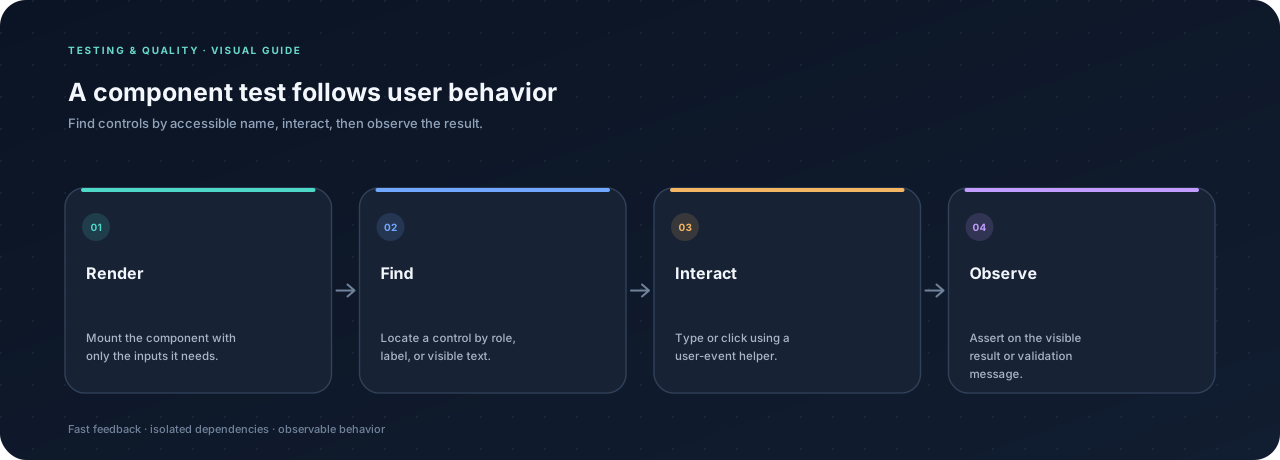
Component tests are most valuable when they protect behavior a user depends on. React Testing Library encourages tests to query elements the way assistive technology and people do: by role, label, or visible text. This keeps tests resilient when the component’s internal structure changes.
Render a small component #
Suppose a form adds a task to a list. A test should be able to find the textbox and button by their accessible names, enter a value, and observe the new task. The test should not depend on a component’s state variable names or CSS classes.
With Vitest, React Testing Library, @testing-library/user-event, and @testing-library/jest-dom installed, a test can use this shape. Import @testing-library/jest-dom/vitest in the test setup if the project does not already configure it:
import { render, screen } from "@testing-library/react";
import userEvent from "@testing-library/user-event";
import "@testing-library/jest-dom/vitest";
import { expect, it } from "vitest";
import TaskForm from "./TaskForm.jsx";

it("adds a task the user entered", async () => {
  const user = userEvent.setup();
  render(<TaskForm />);

  await user.type(screen.getByRole("textbox", { name: /task name/i }), "Read docs");
  await user.click(screen.getByRole("button", { name: /add task/i }));

  expect(screen.getByText("Read docs")).toBeInTheDocument();
});
The exact matcher setup depends on the project, but the test’s intent remains readable.
Prefer accessible queries #
Start with getByRole for buttons, headings, links, and form controls. Use getByLabelText when a form label is the clearest query. If an action updates the interface asynchronously, use findByRole or findByText, which waits for the element to appear within the test timeout.
Avoid querying a generated class or component instance. Those details are not part of the user-facing contract and can change without breaking the behavior.
Test failures and disabled states #
Cover important alternatives: empty input, validation feedback, disabled submit buttons, and server errors. Assert the message people receive, not only that a function was called. If the component calls a server, provide a controlled test dependency or use a dedicated integration test for the network boundary.
Keep scope focused #
Do not re-test React itself or snapshot an entire page to prove one small behavior. A focused interaction test gives a more useful failure message. For full route transitions and browser behavior, use an end-to-end tool such as Playwright.